What your technician sees on their phone
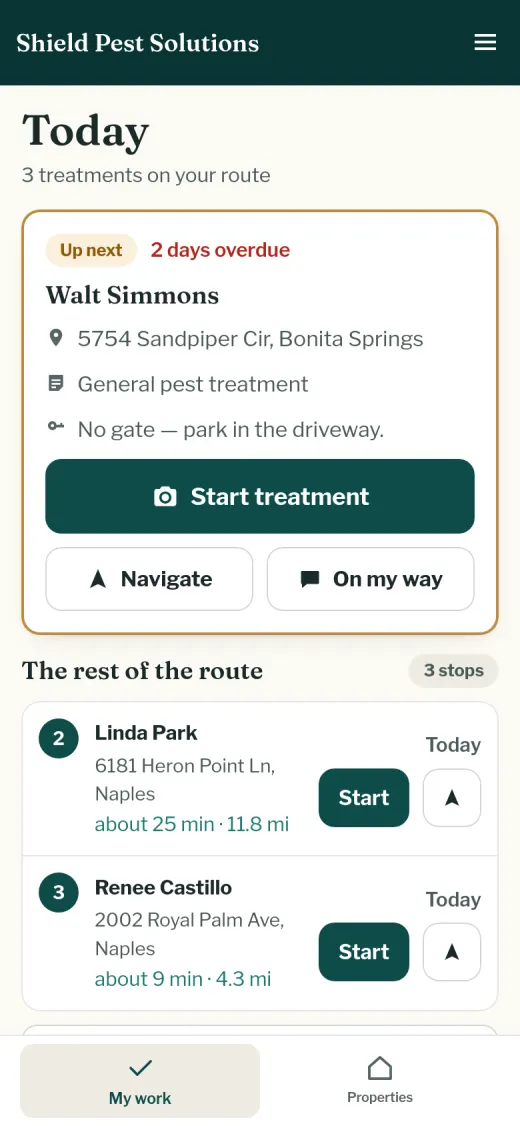
A real screen from the Fewer Miles demo (sample data, reset daily): today's stops in driving order, the next one on top with its notes, and one tap to start the visit, navigate or send an “on my way” text.
Quarterly and monthly treatments scatter across your service area. Fewer Miles groups and orders them into tight routes and sends customers a treatment report with photos.
$59/month, one price, no per-tech fees. 30-day free trial, no card.
Put your route into the free route waste calculator and see how many miles and hours a week you're driving for nothing.
A real screen from the Fewer Miles demo (sample data, reset daily): today's stops in driving order, the next one on top with its notes, and one tap to start the visit, navigate or send an “on my way” text.
A customer who never sees a bug can't see the value. The report lists every area treated: perimeter, eaves, doors and windows, interior if requested. They see what they're paying for, and that's what keeps them.
Pest activity (ants, roaches, rodents, termite signs) and bait-station activity are logged every visit. Rodents, termite signs and heavy bait activity flag themselves and appear under “We noticed”.
Every treatment has a line for the product name and EPA registration number, stored with the date and the report.
A flagged finding raises an alert for you and marks the property “Issue flagged”. Mark it “Follow-up needed” to keep the return visit in view.
Quarterly by default, or weekly, every two weeks or monthly, with overdue treatments flagging themselves to you.
Treatments done, issues caught, on-time percentage, and how many reports customers opened.
No. Fewer Miles records the product and EPA registration number on each visit, but it isn't a licensing or state-reporting system. Keep whatever records your state requires; this puts a copy on the visit.
No. Fewer Miles works in the browser on any phone, tablet or computer. Sign in with a code we email you — no password to remember.
No. The report is a private web link that opens in their phone's browser. Nothing to install, nothing to log in to.
No. A report with no photos still goes out with what you checked off, any readings and your notes. Photos you take appear on the report page, and the PDF of each visit captions every photo with when it was received. If you want your team to always take them, you can require photos in Settings.
Everyone gets the same invitation — Google doesn't allow asking only the happy ones. Paste your Google review link once under Settings and it appears as a button on every report page. In the visit email it appears at most once every 60 days per customer, not after every visit.
We measure real driving times between your stops, the way you drive them now and the way we'd plan them, and price the difference with your truck's mileage, fuel price and what your hour is worth — you can change all three. If your route is already tight, we say so.
You do. We use it only to run your account and never share it. You can download it as a spreadsheet any time from Settings. Lists you upload without making an account are deleted within 24 hours.
Add a card on the Billing page any time. If you don't, your account goes read-only a week after the trial ends — your team can still finish visits and your customers still get their reports.
Want the full walkthrough, the worked savings example and the built-in checklist? See the pest page.
Upload your list and see your week, planned by area, in a few minutes.